Industrial Keyboard – On-screen keyboard for rugged Android devices
Fast, reliable data entry on rugged Android devices.
Industrial Keyboard is an on-screen keyboard for rugged Android devices from Zebra and Honeywell: big keys for gloves, a scanner trigger built in, F1–F24 for terminal emulation – and the whole keyboard configurable from your MDM. For Android 8.0 or later, without internet permission, free of charge under the MIT licence.
Industrial Keyboard is an independent product of ICT Baden and is not affiliated with Zebra Technologies or Honeywell.
Available on Google Play – the store listing will appear shortly. Until then we provide the app on request.


An Android keyboard with function keys (F1–F24) for rugged handhelds
In warehouses, logistics and production, people type on handhelds – often with gloves, often in terminal emulations that need function keys, and usually right before or after a scan. Industrial Keyboard is a keyboard for rugged handhelds built for exactly that work: as an Android input method it appears in every input field and is configured centrally for the whole fleet.
On-screen keyboard features
-
Made for gloves
Key height 70–160 % (120–140 % for gloves), forgiving touch targets, preview bubble above the finger, rollover typing and a high-contrast theme.
-
Function keys F1–F24
Fn tab with F1–F12, Shift for F13–F24, plus Esc, Ins, Del, Home, End, PgUp, PgDn and arrows; optionally an extra fixed F1–F12 row above the letters.
-
Scanner built in
Scan tab with a large trigger pad: tap for one scan, hold for continuous scanning. Zebra DataWedge and Honeywell are detected automatically, other scanner apps are triggered by intent. Scans that only arrive as a broadcast can be typed by the keyboard itself – off by default and never into password fields.
-
The right keys for every field
Number fields open the numeric pad (phone or calculator order, PIN, date, time), e-mail and URL fields get @, / and .com, Enter shows the field’s action.
-
Custom layouts and macros
Your own keyboards such as OK / Skip / Damaged as extra tabs, defined in JSON – no app update needed. Macros such as
{TAB},{F13},OK{ENTER}or{SCAN}. -
Alphabets
QWERTY, QWERTZ, AZERTY, Nordic and Spanish, accents on long press, optional number row.
-
Central configuration
Managed configuration from any EMM (SOTI MobiControl, Microsoft Intune, Workspace ONE), configuration file – on Zebra also in
/enterprise/usr– or StageNow broadcast. An admin password protects the settings and remote configuration; 5 wrong attempts lock it for 5 minutes. Error messages carry codes such asIK-0100. -
Private by design
No internet permission, no dictionary, nothing you type is stored or learned; the configuration is excluded from backups.
F13–F24 for terminal emulation (5250)
Android has key codes of its own above F12 only from Android 16 (API level 36) on. Industrial Keyboard sends F13–F24 as Shift+F1…F12 on every Android version – which needs no such key codes and is the mapping 5250 terminal emulators use. The terminal-emulation.json template configures the keyboard for terminal emulation: a function key row, an Esc key and a Host tab with F13–F24, Field exit and Reset.
More templates: warehouse-gloves.json with high contrast, 135 % keys, calculator pad and scan key, custom-layout.json with a picking tab, and classic-keys.json without a tab bar.
Switching from the device manufacturer’s keyboard: Industrial Keyboard as an alternative
For teams that use the device manufacturer’s keyboard or a commercial on-screen keyboard for industrial devices on rugged Android devices today and want one that also runs on devices from other vendors. Industrial Keyboard does the same job – an input method for rugged Android devices with function keys, a scan key and central configuration – and is free of charge under the MIT licence, with no licence server and no device binding.
- Runs on any Android device with Android 8.0 or later; soft trigger for Zebra DataWedge and Honeywell, other scanner apps via intent.
- F1–F24 (F13–F24 sent as Shift+F1…F12), big keys for gloves, custom layouts and macros in JSON.
- Configuration as a managed configuration from any EMM, as a file or via StageNow; on Zebra devices an MX profile makes it the default keyboard.
- No internet permission, no dictionary, nothing you type is stored.
Honestly, for anyone switching: Industrial Keyboard does not import the configuration of other keyboard apps – layouts and settings are set up again in JSON. Word suggestions, autocorrect, swipe typing and voice input are deliberately left out.
System requirements
- Operating system
- Android 8.0 or later
- Scanner
- soft trigger for Zebra DataWedge and Honeywell, other scanner apps via intent
- Permissions
- vibration only – no internet permission
- Distribution
- APK via MDM or adb; Google Play is prepared
- Language
- English and German; Spanish, French and Chinese machine-translated
Limits, honestly
- The Honeywell trigger follows the vendor documentation and has not been tested on a Honeywell device yet.
- Spanish, French and Chinese are machine translations and have not yet been proofread by native speakers; key labels are not translated.
- No dictionary, no word suggestions, no autocorrect, no swipe typing, no voice input and no emoji picker – deliberately, so that nothing typed is stored or learned.
- The admin password protects the settings and remote configuration but is not a device lock: whoever can uninstall the app or clear its data gets the defaults.
- Google Play is prepared but not published yet.
What Industrial Keyboard looks like
The screenshots are rendered from the real keyboard code.
-
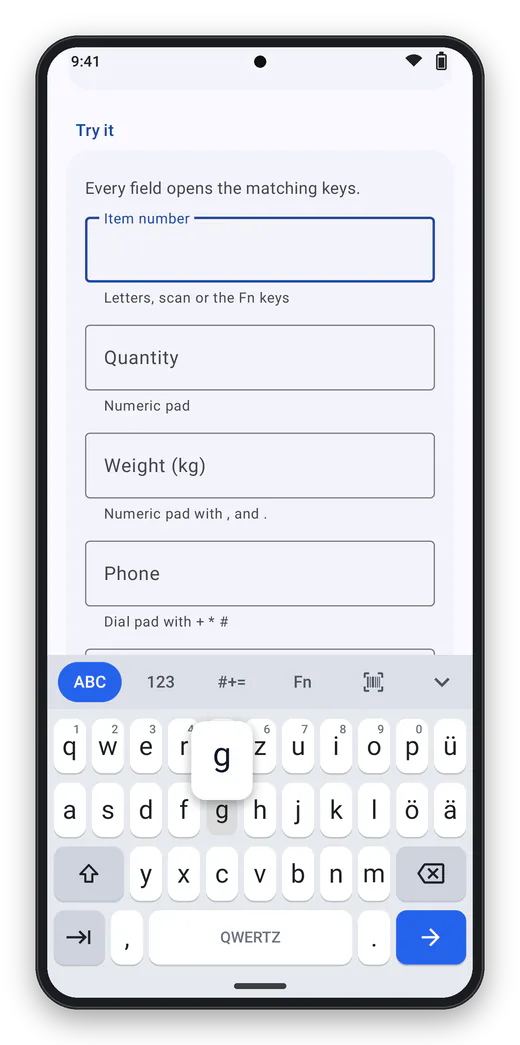
Letters Key preview above the finger, tabs for numbers, symbols, function keys and scan. -
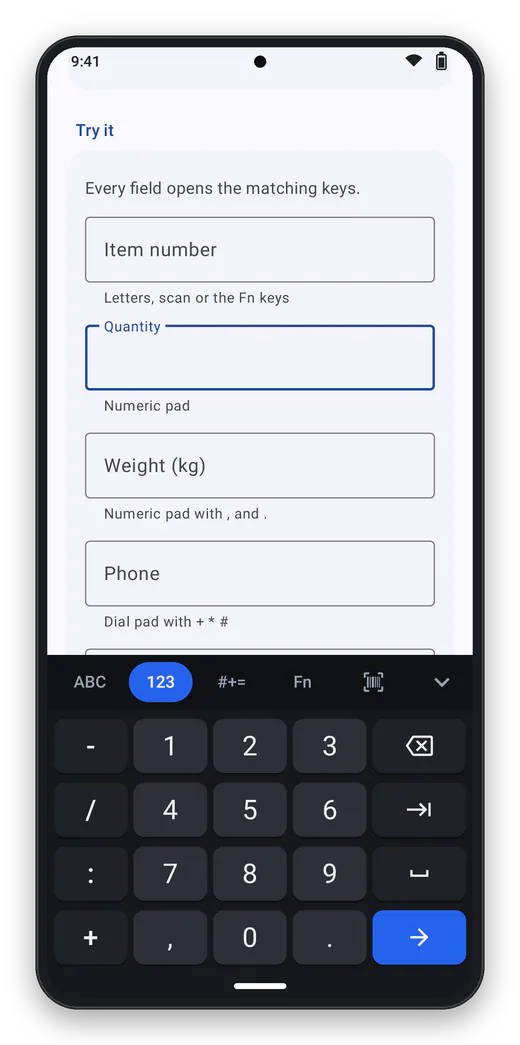
Numeric pad Opens by itself in number fields. -
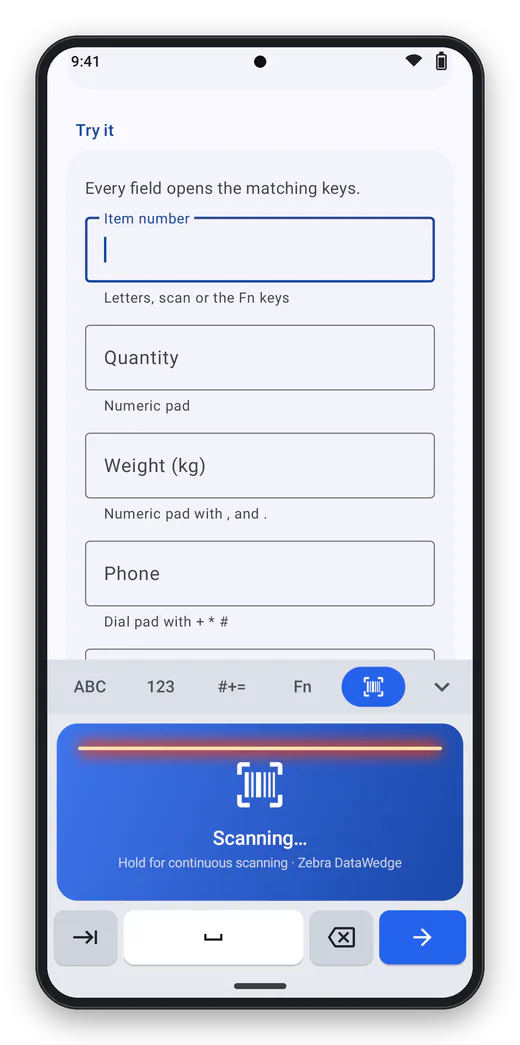
Scan tab Tap to scan, hold for continuous scanning. -
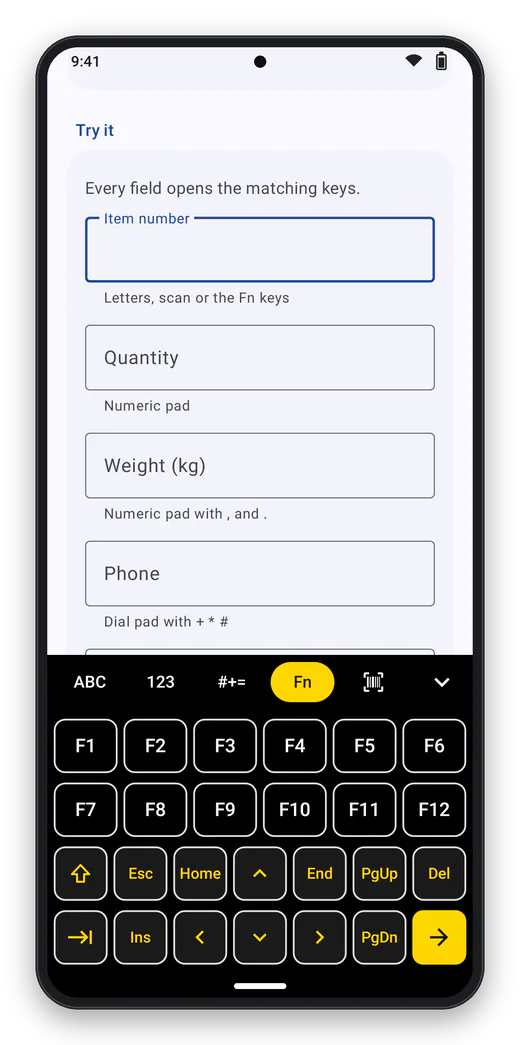
Function keys F1–F24, Esc, Ins, Del and arrow keys – for terminal emulators, for example. -
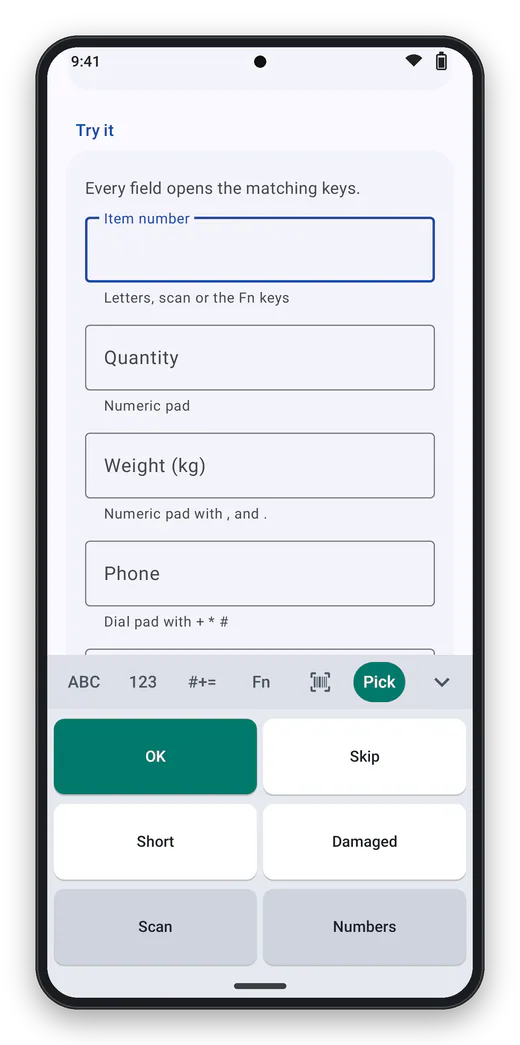
Custom layouts Your own keys as an extra tab, defined in the configuration – no app update needed. -
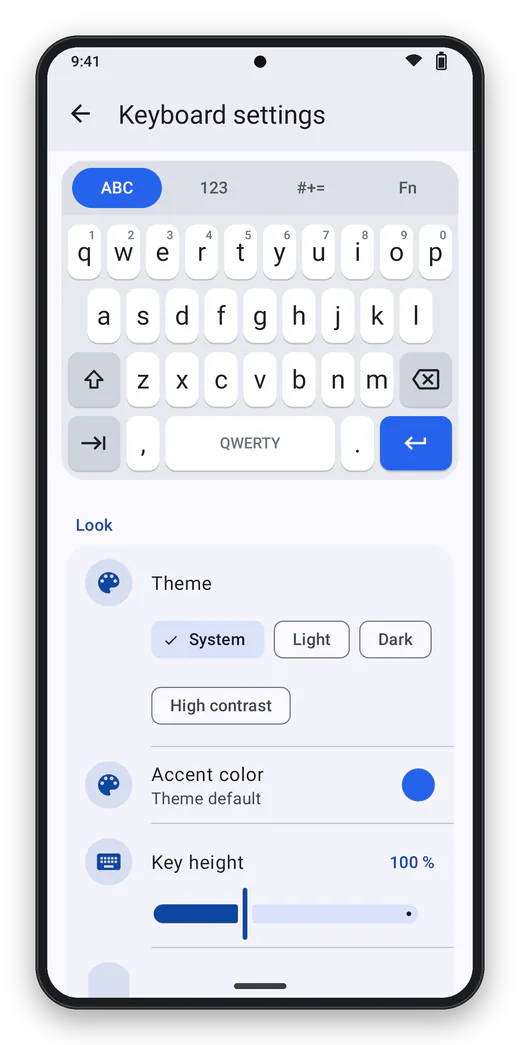
Settings With live preview, password protected.
Frequently asked questions
Is there an Android keyboard with F1–F24 function keys for rugged devices?
Yes, Industrial Keyboard: the Fn tab shows F1–F12, Shift adds F13–F24, plus Esc, Ins, Del, Home, End, PgUp, PgDn and the arrows. To keep F1–F12 always visible, switch on the function key row above the letters.
Is there an Android keyboard with F13–F24 for terminal emulation?
Yes. Shift turns the top rows into F13–F24, which Industrial Keyboard sends as Shift+F1…F12 on every Android version – the mapping 5250 terminal emulators expect; key codes of their own for F13–F24 only exist from Android 16 on.
Which Android keyboard works well with gloves?
A glove-friendly keyboard needs big keys and forgiving touch targets. Industrial Keyboard’s key height goes from 70 to 160 %, with 120–140 % recommended for gloves, plus a preview above the finger and a high-contrast theme.
Can the keyboard trigger the barcode scanner?
Yes. The scan tab and the optional scan key pull the soft trigger: Zebra DataWedge and Honeywell are detected automatically, other scanner apps can be triggered by intent.
Can I configure the keyboard through my MDM?
Yes, as a managed configuration (key config_json) in SOTI MobiControl, Microsoft Intune or Workspace ONE, as a configuration file or by StageNow broadcast. On Zebra devices an MX profile (UI Manager) makes it the default keyboard.
Does the keyboard store or send what I type?
No. Industrial Keyboard has no internet permission and no dictionary, and stores or learns nothing you type. Only the configuration is stored, the admin password as a salted hash.
Is Industrial Keyboard free?
Yes, free of charge under the MIT licence, with no ads and no in-app purchases. Support with agreed response times is available with a support contract. The download follows with the public release.
Is there a free alternative to the manufacturer’s keyboard on rugged Android devices?
Yes: Industrial Keyboard is an on-screen keyboard for rugged Android devices, free of charge under the MIT licence, with no ads and no in-app purchases. It offers F1–F24, a scan key for DataWedge and Honeywell, big keys for gloves and configuration through your MDM – and it also runs on devices from other vendors.
Industrial Keyboard is an independent product of ICT Baden and is not affiliated with Zebra Technologies or Honeywell. Zebra, DataWedge and StageNow are trademarks of Zebra Technologies, Honeywell is a trademark of Honeywell International; Android, SOTI MobiControl, Microsoft Intune and Workspace ONE are trademarks of their respective owners. They are named only to describe compatibility.
Contact
Interested in Industrial Keyboard?
Tell us what you would like to use the product for – we will get back to you personally.